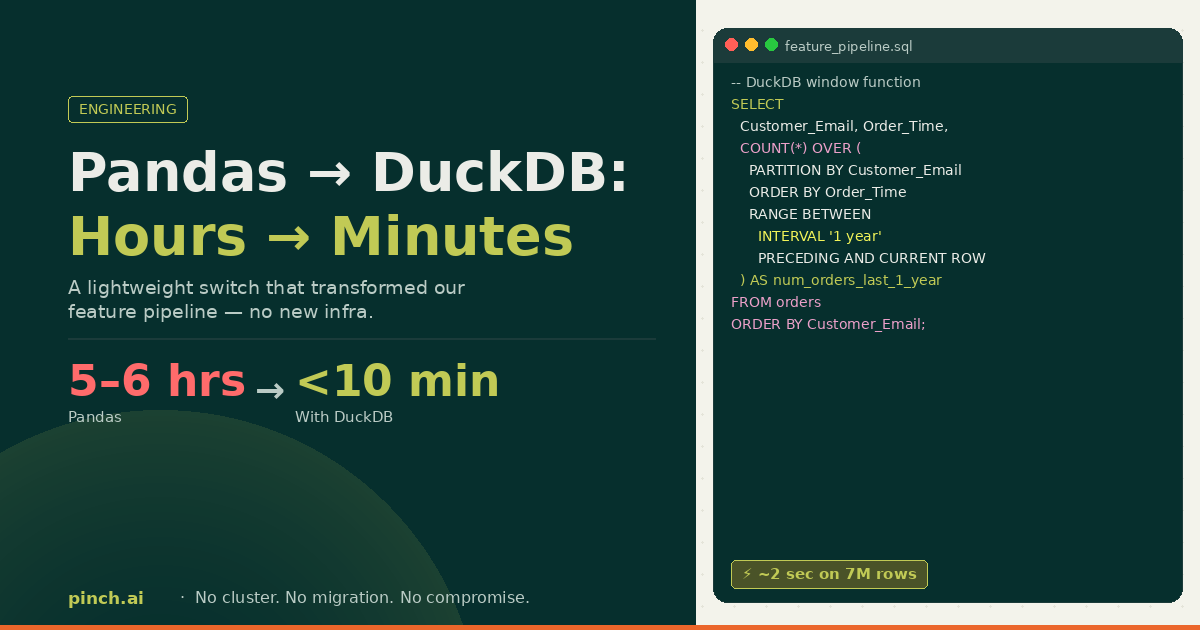
Pandas to DuckDB: A Lightweight Switch That Took Our Feature Runs From Hours to Minutes
February 19, 2026
By Mandeep Kaur
From 5–6 hour Pandas runs to under 10 minutes in DuckDB - without heavy infra. Notes from the trenches.
It began the way many “quick” data tasks begin: an offline feature script, a Pandas DataFrame, and a quiet belief that we were still in control. We were computing velocity-style features for analysis - the kind that answer “how active is this email?” across rolling windows: orders in the last year, last six months, last three months, and so on. At early scale, Pandas was the right tool. It’s flexible, it’s expressive, and it keeps you close to the data. So we built the pipeline there and shipped value quickly.
But scale has a way of turning “works fine” into “works… eventually.”
When Scale Exposed the Limits
With roughly 100k orders and about 100 variables, the pipeline was taking ~5–6 hours. We optimized - enough to bring it down to ~2 hours - which was acceptable for early onboarding and offline analysis. Then we tried the same computation on roughly ~5–7M order rows. At that point, “how long will this take?” wasn’t a planning question - it was a warning sign. The pipeline wasn’t just slow; it was signaling that the execution model didn’t match the workload.
We had two obvious paths: keep squeezing performance out of Pandas, or change the stack. Distributed frameworks like PySpark were on the table - and they’re great tools - but they come with real tradeoffs: heavier infrastructure, longer setup, and operational complexity that felt disproportionate to the problem we were solving. What we needed was simple: database-grade analytical performance, but still lightweight enough to live comfortably inside a Python workflow.
The Plot Twist: DuckDB
I remembered a casual conversation from months ago about DuckDB - “SQLite for analytics,” but built for OLAP-style scans, joins, and aggregations, running in-process with your code. No cluster. No platform migration. Just a new execution engine. So I tried it quietly first (the classic “let me prove it before I propose it” move). I rewrote 1–2 variables inDuckDB SQL and ran them against the same data. They finished in ~2 seconds.
Aha: the surprise wasn’t only speed - it was how expressing the intent as SQL let one engine own the plan end-to-end.
Migration in Hours, Not Weeks
Once the experiment held up, I converted the full Pandas script into DuckDB SQL. It took ~3–4 hours (shout out to Cursor + ChatGPT). Then I ran the full pipeline on ~5–7M orders. Total runtime: under 10 minutes.
Note: That “hours to minutes” jump was real for us, but it’s not a universal constant. Runtime will depend on the shape of your task (window sizes, joins, cardinality), number of variables, and the basics like machine CPU, memory, storage, and data format/layout. Treat the numbers below as directional, not a promise.
The Validation Phase: Trust Issues With Speed
This is the part people underestimate. When something that used to take hours finishes in minutes, your first reaction isn’t celebration - it’s suspicion. I didn’t trust the output at first. I spent more time validating the computed variables than converting the code. Once the validations checked out, I brought it to leadership. They were just as excited. And honestly: that validation work was the most painful part - kudos to my team for helping close the loop.
- ~100k orders × ~100 velocity variables in Pandas: ~5–6hours → after optimization: ~2 hours
- ~5–7M orders same feature set in Pandas: not practical/ didn’t scale (for us) → DuckDB: under 10 minutes
- ~5–7M orders (1–2 test variables) in DuckDB: ~2 seconds
For one feature - num_orders_per_email_in_last_1_year - the story is basically this: Pandas tends to “loop each row → filter → count.” DuckDB turns the same intent into a single window function the engine can optimize.
Pandas# Pandas (simplified)
import pandas as pd

df["Order_Time"] = pd.to_datetime(df["Order_Datetime_ms"], unit="ms")

df = df.sort_values(["Customer_Email", "Order_Time"])

def num_orders_last_1y(row, group):
    anchor_time = row["Order_Time"]
    min_time = anchor_time - pd.DateOffset(years=1)

    filtered = group[
        (group["Order_Time"] >= min_time) &
        (group["Order_Time"] <= anchor_time)
    ]
    return filtered["Provider_Order_ID"].nunique()

df["num_orders_per_email_in_last_1_year"] = (
    df.groupby("Customer_Email", group_keys=False)
      .apply(lambda g: g.apply(lambda row: num_orders_last_1y(row, g), axis=1))
)DuckDB- DuckDB (simplified)
SELECT
  Provider_Order_ID,
  Customer_Email,
  Order_Time,
  COUNT(*) OVER (
    PARTITION BY Customer_Email
    ORDER BY Order_Time
    RANGE BETWEEN INTERVAL '1 year' PRECEDING AND CURRENT ROW
  ) AS num_orders_per_email_in_last_1_year
FROM orders
ORDER BY Customer_Email, Order_Time;
Why DuckDB Was So Fast (Without the Lecture)
DuckDB is an in-process analytical database designed for OLAP workloads: large scans, aggregations, joins, analytical windows. It’s fast because it leans on columnar execution, vectorized processing, and a query planner that’s built to optimize this exact shape of work. And because it integrates cleanly with Parquet and Pandas/Arrow, it fits naturally into Python-heavy workflows.
Aha: This wasn’t “SQL vsPython.” It was picking an execution engine that matches the workload - and letting it do the heavy lifting.
When DuckDB Is Not the Right Tool
DuckDB is fantastic for heavy single-node analytics, but it’s not universal. It’s a poor fit if you truly need distributed compute at very large scale, if you need a multi-user transactional database, if your workload is continuous streaming, or if you need a centralized platform for governance across many teams.
The Outcome: Unlocking Auto-Onboarding
Once we moved feature computation to DuckDB, we unlocked auto-onboarding merchants. The same feature logic that used to be “offline-only” became practical to run reliably and frequently. That’s the part I like most: a focused change removed a systemic bottleneck and created real product leverage.
The lesson I took away wasn’t “rewrite everything in SQL.” It was simpler: pick the execution engine that matches the shape of your work. For us, DuckDB was the smallest change with the biggest upside - and it’s now a permanent tool in the toolbox.